Describe it in plain words. It comes out at the exact size for the platform, with headlines you place and edit yourself instead of letting the AI melt them into the picture. No design tool, no guessing dimensions.
Every one of these came out at the exact size shown, with the headline placed on top as a layer you edit. Never baked into the pixels, so it never garbles.
No layers to learn, no canvas math. Describe it, drop your headline on top as an editable layer, then tweak the same image until it is right.
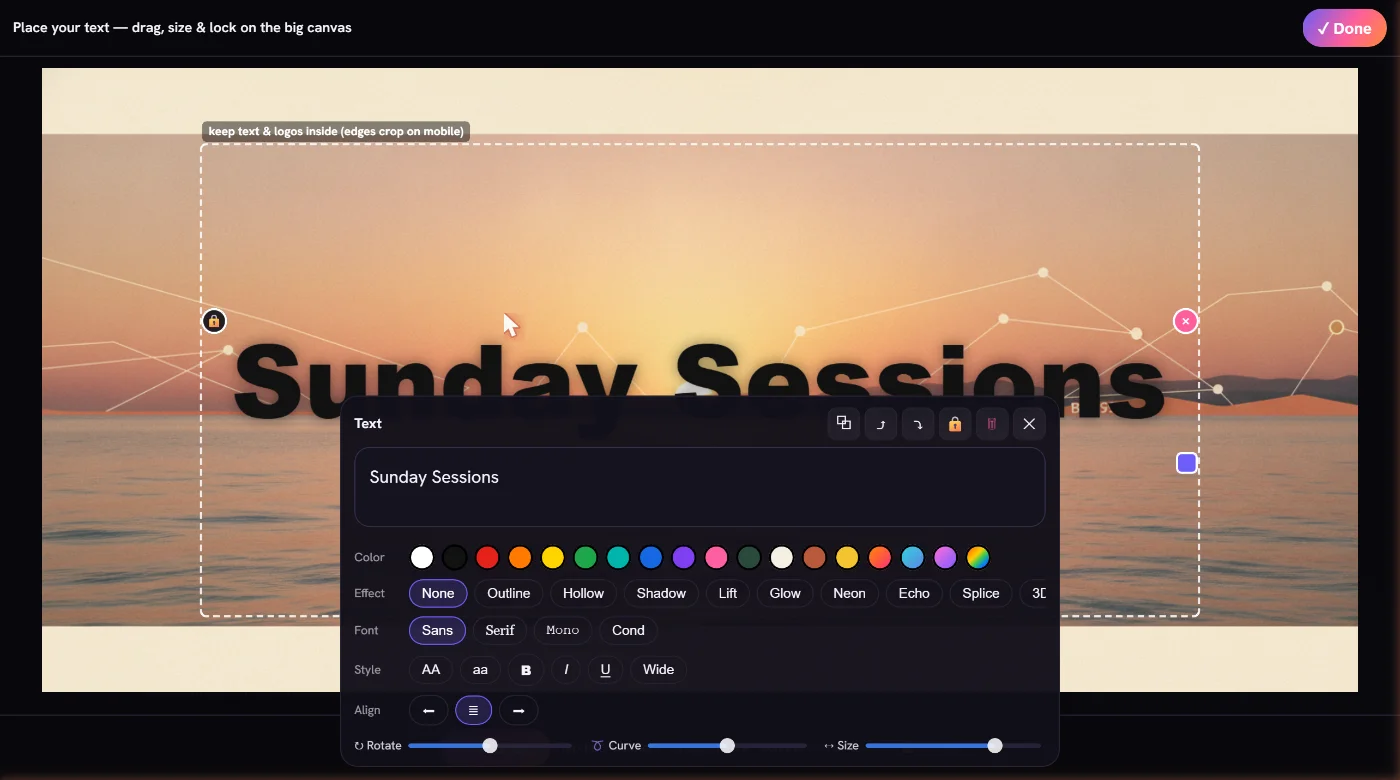
No layers, no canvas math, no exporting at the wrong size.
Choose a platform and the exact surface. A YouTube banner, an Instagram profile picture, a LinkedIn cover, a Letter flyer, a business card. The right size is already loaded.
Type how it should look, and put any headline in "quotes". The AI keeps a clean background and drops your words on top as editable text, instead of garbling them into the picture.
Drag, recolor, rotate or curve the text. Then tweak the image: change a color, swap the background, remove an object. Edits change the same picture, so you keep the look you liked.
Stop hopping between single-purpose tools and size charts.
Put your words in "quotes" and they land as real, editable text. Never melted or misspelled like other AI. Recolor, rotate, curve, restyle, and drag them wherever you want.
Every platform plus print, at the exact pixel size, always ready to post. Even ultra-wide banners fill the frame instead of cropping a square down.
Image-to-image edits keep your composition, your subject and your palette. Not a fresh roll of the dice.
More than social. Letter flyers, posters, handbills, door hangers, postcards and business cards, all at print-ready sizes.
Save your colors, logo and a signature look once. Every asset comes out on brand without you thinking about it, so your feed actually looks like you.
Remove the thing you don't want, swap a background, change the mood. No design app needed.
Your subject stays inside each platform's crop zone, so banners and avatars never get their heads cut off.
Save designs with the text baked in, bring back any earlier version, and adapt one asset to every other platform's size in a click.
Where each one actually wins. No hype. See the full alternatives comparison.
| What you need | AI All Social | Generic AI image tools | Canva / design apps |
|---|---|---|---|
| Correct platform sizes, automatic | Built in for every platform and print | You resize manually | Templates, but you pick |
| Readable, editable text on the image | Sharp and fully editable | Garbles baked-in text | Manual, but yes |
| Tweak edits the same image | Yes, scoped image-to-image | Regenerates a new picture | Manual editing |
| One place for every platform | Yes | Single-purpose | Yes |
| Speed from idea to export | Fast, just plain words | Prompt, then manual crop | Hands-on design time |
| Best for hand-crafted layouts | AI-first | AI-first | Strong here |
| Starting price | $4.99/wk, about $5.83/mo yearly | Varies | Free / paid tiers |
One asset is one generation or one tweak that hits the AI. Pick a plan to start.
Every plan includes all the features. The only difference is how many assets you make. Secure checkout by Stripe.
One AI studio that makes logos, banners, profile pictures, posts, flyers and business cards. Each one comes out at the right size for the platform you pick, so it is ready to post or print.
No. Every platform's size is built in. You pick the surface and the image is exported at those exact pixels, with your subject kept inside the safe zone. (See the full size guide.)
A tweak edits the same image instead of rolling a brand new one. Change a color, swap the background, or remove an object, and the rest of the picture stays put. It holds the look well, and you can lock any version you like.
No. Generating needs either a plan or the one-time $3.99 Starter Pack, so you can pay once without subscribing to anything. Plans start at $4.99 a week, and the yearly plan works out to about $5.83 a month. You can try the studio in the no-signup demo first.
Instagram, Facebook, X (Twitter), LinkedIn, YouTube, TikTok, Pinterest, Threads, Bluesky, Discord, Twitch and Snapchat, plus universal logo and avatar presets. There is also a Flyers & Print category for flyers, posters, handbills, door hangers, postcards and business cards.
Yes. Put any headline in "quotes" in your prompt and it lands on the result as an editable text layer. A built-in editor lets you change the words, the color, the font effects, the alignment and case, and rotate or curve the text. Then you drag it exactly where you want it.
No. We do not bake text into the generated pixels, which is what causes the melted, misspelled lettering you see in other tools. The picture is generated clean and your words go on top as real, editable text. Always sharp, never cropped, always fixable.
Yes. The Flyers & Print category covers Letter flyers in portrait and landscape, large posters, half-page handbills, door hangers, postcards and standard business cards, all at print-ready sizes. The editable text is what makes them work, since a flyer is mostly words on a background.
Yes. The studio runs in any mobile browser, and there is a native iPhone app on the App Store under the name AI All Social. One account carries your Brand Kit and your library across both.
It is built for one person handling their own posting: creators, small business owners, freelancers and side projects. If you would rather describe an image than lay one out, it fits. It is not shaped around agency or team workflows.
Yes. The demo opens without signing up so you can see how the studio works, and generating an image needs a plan or the one-time $3.99 Starter Pack. For a single image, a free tool is genuinely a sensible choice. Paying pays off when you are making assets regularly.
Yes. Adapt to another size re-frames an asset you already like into another platform's dimensions, keeping the same scene and look, so a campaign stays recognisable everywhere it lands. Each adapt counts as one generation.
The Brand Kit holds your logo or style reference, up to four colors, a few style notes and one Signature Look, which is a single color grade chosen from seven presets. Turn on Use my brand and those are applied as each asset is generated, so a feed made across many platforms still reads as one brand.
Canva and Adobe Express for laying designs out from templates, general AI image generators like ChatGPT, Gemini and Midjourney for the best raw picture, each platform's own editor for a free quick crop, and a freelance designer when it has to be exactly right. There is an honest comparison on the alternatives page, including where each of those wins.
Yes. Your prompts and generated images are yours. We never sell your data, and you can delete your assets whenever you want.
Yes. Manage or cancel your subscription whenever you like through the Stripe billing portal. No emails, no hassle.
More depth: What is AI All Social? · How it compares to the alternatives · Every platform size for 2026
One AI studio for every platform plus print. Posts, banners, flyers and business cards, always the right size, with text you can edit.